Dalilya Rakhmatulina | Technical Game Designer


Sounds of Shadows

Unreal Engine 5

23 Developers

First-Person Horror

4 Months
Sounds of Shadows is an echolocation-based stealth horror game. Crouch, hide, and deceive the monster as you move through the science facility and learn of the tragic events that occurred here.
Limited Visibility
The player can see very little of the surroundings. To see more, the player is encouraged to move around/make sounds.
Sound-Based Gameplay
All the gameplay loops are linked to the sound. To see, the player has to make a sound. The sound attracts the monster. Player can distract the monster with the sound, and player can also attack the monster with the sound.
Game Trailer
Project Role
Technical Game Designer
I joined this project towards the end of the concepting stage, taking on the responsibilities of a Technical Game Designer. I was responsible for creating supporting systems and balancing character movement and controls. These responsibilities included:
-
Building the environmental interactions' logic;
-
Prototyping and implementing player abilities, such as:
-
Hacking ability;
-
Level manipulation using radio frequencies;
-
Pushable objects;
-
Voice log functionality.
-
-
Balancing, playtesting and iterating on the character movement, which included: walk and crouch speed, view range, enemy range, shader ripple speed, footstep sound and visual intervals.
Building Environmental Interactions' Logic
What?
- I remade logic for the hold button: it's a button player needs to hold to open the remote door.
- I remade logic for throwable items: when thrown, they make a sound that attracts the monster.
- I remade logic for doors: regular and remote.
How?
Hold button:
The player has to keep looking at the button and interacting with it for it to activate. While idle, it sends out passive ripples, when being pressed, it sends out active ripples. When pressed or released, interact UI also gets updated to show the progress.
Throwables:
Throwables are actors that use physics. On event hit, they check the velocity to make sure the item was thrown, and play a sound.
Interact UI:
I made a widget component that showed interact text and optionally a progress bar. When interacting with an object, player character checks if the object has the widget component. When an item should no longer be interactable, the widget component gets destroyed.
Why?
After I joined the team along with 20 other developers, we decided to create a new project and rebuild all the functionality from scratch. I was responsible for moving and refactoring the environmental interactions.
Please zoom out using CTRL + Scroll wheel
Blueprint example: Hold Button logic

Hold Button

Remote Door
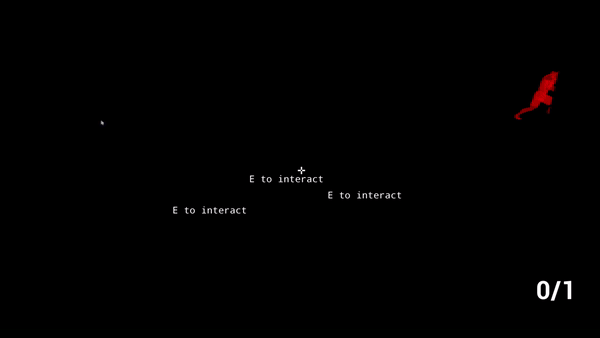
Throwable Item
Prototyping and Implementing Player Abilities:
Hacking Prototype
What?
In the concepting stage, I designed and prototyped player abilities. For example, I made a hacking ability prototype. This was the concept:
The player has a map with doors and codes to open them, as well as a textbox where they could type the code;
The player had to be able to move the camera but not move the character when opening the hacking menu, while simultaneously being able to type in the textbox;
If the name was correct, the door opened, if incorrect, it elicited a loud noise that was supposed to attract the monster and punish the player.
How?
I first created the “hacking” logic with the doors and then made a basic UI for it.
The main challenge was to make it work so that the player could type while simultaneously moving the camera. The player was always either focused on the UI, or the game, and actions both in game and UI could not be performed simultaneously.
In the end, to make it work, I had to check all keys for the right input in the player character blueprint, and create custom textbox logic instead of using the unreal default one. Technically, the focus was never set to UI, the text was being sent from the player blueprint. When the UI was toggled, I just switched different input mapping contexts.
Why?
This idea was explored in the concepting stage to see the different directions we could take our game in. In the end, we realized that it was not an additional gameplay loop but instead a fully new game concept. The idea was scrapped.

Hacking prototype: typing in the code to open the door

Hacking prototype: typing while rotating camera but not being to move
Prototyping and Implementing Player Abilities:
Level Manipulation Using Radio Frequencies
Description
In the second sprint, my team focused on prototyping environmental interactions. I created three prototypes, one of which was a radio mechanic that allowed players to open doors by tuning into the right frequencies. The idea tied into our narrative (a robot exploring an underground facility where radio signals could plausibly function) and complemented our sound-based gameplay. I was largely inspired by the radio mechanic from Oxenfree.
Why was it made?
The prototype was designed to explore how environmental interactions could enhance both the narrative and gameplay. The radio mechanic felt like a natural fit for our sound-focused core loop and added a layer of immersion to the underground facility setting.
Conclusion
While the team liked the concept, it was ultimately scrapped because implementing the radio would have required redesigning large parts of the game to accommodate it. Still, it was a fun experiment that aligned well with our vision, and I’m proud of how it turned out as a prototype.

Finding the right radio frequency to open the door

Using Radio Frequency Mechanic
Prototyping and Implementing Player Abilities:
Pushable Objects
Description
I created a prototype for a simple pushable object that interacts with the environment. It could be used to solve basic puzzles and open pathways. While being pushed, it also generates sound, adding to the core loop—helping the player progress while simultaneously attracting the monster.
I used unreal physics in combination with some custom logic to make sure that the object moves smoothly in only 1 direction at a time.
Why was it made?
The goal was to introduce an interactive element that tied directly into the game’s core tension: progress vs. risk. Players could use it to clear obstacles, but the noise would increase danger. However, by the time the prototype was finished, the team had already decided to focus on other mechanics due to time constraints.
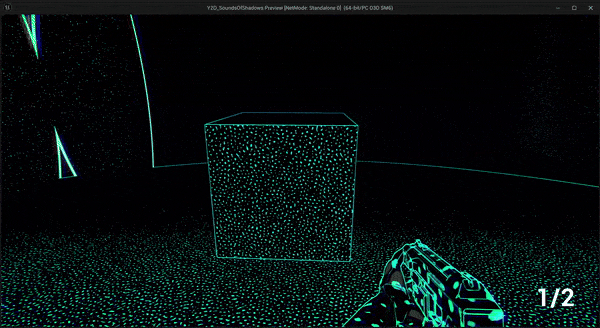
Pushing object forward while creating sound
Conclusion
While the feature wasn’t used in the final game, it was an interesting experiment in balancing player agency and risk.
Prototyping and Implementing Player Abilities:
Voicelog Functionality
Description
Closer to the end of production, our narrative designer asked me for help with implementing a pause function for our voice logs. I created a timer with a simple UI that displayed the time left of the current voice log. The timer matched the length of the selected voice log. When the player pressed P, both the audio and the timer paused, and they resumed when P was pressed again.

Voicelog Functionality: Here, you can see how when a different audio track is selected in the editor, the timer length adjusts as well
Why was it made?
The narrative designer needed this functionality to test different types of voice log behavior—comparing dynamic voice logs with static ones—to inform her decision on which to use. She mentioned that static voice logs were likely to be chosen, which meant that the pause and timer functionality wouldn't be used, but the test was necessary to validate the best approach for our game.
Conclusion
I knew from the start that this feature might eventually be scrapped, but building it was still a valuable and enjoyable exercise. The prototype helped shape our overall direction and provided useful insights into the voice log system, contributing to our design decisions even if it wasn't used in the final game.
Balancing, Playtesting, and Iterating
on Character Movement
Description
As part of refining the core 3Cs, I focused on balancing the player’s view range when walking and crouching, as well as adjusting how far enemies could hear each movement. Walking had to feel risky—giving the player enough visibility to navigate but making them easy to detect. Crouching, on the other hand, had to feel safer but restrictive, forcing the player to stand up when they needed a better view of their surroundings.
To ensure consistency, I linked the enemy’s hearing range to the player’s view range, but slightly extended it—setting the max detection distance to the view range +50 for both states. This meant that if the player could see an enemy, they were also at risk of being heard, reinforcing a constant sense of danger.
I also sped up the ripple effect, making it twice as fast to provide quicker feedback on the environment. Additionally, I adjusted footstep frequency to be less overwhelming for testers, especially during crouching. Since crouching already reduced visibility, making footsteps less frequent added to the feeling of being more “blind,” as players relied less on sound-based ripples for navigation.

Footstep Ripples when Walking and when Crouched
Why did I work on this?
The feel of movement is at the core of our game. With its stealth and echolocation mechanics, every step, sound, and visual cue is crucial. I focused on balancing walking and crouching so that the player's movement not only feels responsive but also reinforces the constant tension of being detected. This design ensures that each movement provides meaningful feedback, immersing players in a world where every decision counts.
Conclusion
The refined movement system now delivers a dynamic and immersive experience that truly supports the game's stealth mechanics. By aligning movement, sound, and visual cues, players receive consistent feedback that enhances both strategy and tension, ultimately making the gameplay more engaging and impactful.